Trying to Make a 3 DoF Arm with Mini Maestro 18

def set_target_one(device, position, servo=1):
    """Sends the target position to a specific servo channel using a control transfer."""
    # bmRequestType = 0x40 (Vendor-defined request, host-to-device direction)
    bm_request_type = 0x40
    b_request = REQUEST_SET_TARGET

    # Value parameter requires position in quarter-microseconds (input * 4)
    w_value = int(position * 4)
    w_index = int(servo)

    try:
        # usb.core.Device.ctrl_transfer(bmRequestType, bRequest, wValue, wIndex, data_or_wLength, timeout)
        device.ctrl_transfer(
            bm_request_type, b_request, w_value, w_index, data_or_wLength=0, timeout=5000
        )
    except usb.core.USBError as e:
        print(f"USB Transfer failed: {e}", file=sys.stderr)

Currently, I can only move one servo at a time. This is a blocker for the arm I am producing.

And…

One of the servos controlled via the Maestro 18-Channel module seems to like to spin freely when given commands. It listens to 0 being a stop function but spins in only one direction freely at the same speed no matter if I choose 1 or 180 for its start to stop procedure.

See the below code for this effort:

def main():
    print("Searching for Pololu Maestro device...")
    device = find_maestro_device()

    if device is None:
        print("Error: Maestro device not found. Check physical connections or permissions.")
        sys.exit(1)

    print("Device found and initialized successfully.")
    servo_channel = '0'
    servo_channel = '1'
    servo_channel = '2'

    try:
        while True:
            user_input = input("Enter position (or 'q' to quit): ").strip()
            if user_input.lower() == "q":
                break

            try:
                position = int(user_input)
                set_target_zero(device, position, servo_channel)

                set_target_one(device, position, servo_channel)
                set_target_two(device, position, servo_channel)

            except ValueError:
                print("Invalid input. Please enter an integer number.")

    except KeyboardInterrupt:
        print("\nExiting program.")
    finally:
        # PyUSB handles closing the device and recycling handles implicitly on exit,
        # but clearing configurations ensures safe detachment.
        usb.util.dispose_resources(device)


if __name__ == "__main__":
    main()

Does anyone see what I may be doing versus what needs to be done so that I can control the Maestro 18-Channel servo module with more control?

Seth

There are a few of parts of your code snippet that do not seem to make sense without more context. For example, you are redefining servo_channel three times, back-to-back-to-back. Additionally, you mention using position values of 1-180 but the Maestro expects the target positions to be in units of quarter microseconds (so 4000-8000 would be equivalent to the standard 1000-2000 microsecond pulse width range for RC servos). Could you post your complete code, including the definitions of your functions?

Also, could you post links to the servos you are using?

Brandon

1 Like
#!/usr/bin/python3

# Where did this source code come from?
# I am still researching older notes and ideas...

import sys
import usb.core
import usb.util

# Constant definitions mimicking the C++ implementation
VENDOR_ID = 0x1FFB
PRODUCT_IDS = [0x0089, 0x008A, 0x008B, 0x008C]
REQUEST_SET_TARGET = 0x85  # The standard Pololu Maestro native USB request ID

def find_maestro_device():
    """Loops through known product IDs to find the Pololu Maestro device."""
    for pid in PRODUCT_IDS:
        device = usb.core.find(idVendor=VENDOR_ID, idProduct=pid)
        if device is not None:
            return device
    return None

def set_target_zero(device, position, servo=0):
    """Sends the target position to a specific servo channel using a control transfer."""
    # bmRequestType = 0x40 (Vendor-defined request, host-to-device direction)
    bm_request_type = 0x40
    b_request = REQUEST_SET_TARGET

    # Value parameter requires position in quarter-microseconds (input * 4)
    w_value = int(position * 4)
    w_index = int(servo)

    try:
        # usb.core.Device.ctrl_transfer(bmRequestType, bRequest, wValue, wIndex, data_or_wLength, timeout)
        device.ctrl_transfer(
            bm_request_type, b_request, w_value, w_index, data_or_wLength=0, timeout=5000
        )
    except usb.core.USBError as e:
        print(f"USB Transfer failed: {e}", file=sys.stderr)

def set_target_one(device, position, servo=1):
    """Sends the target position to a specific servo channel using a control transfer."""
    # bmRequestType = 0x40 (Vendor-defined request, host-to-device direction)
    bm_request_type = 0x40
    b_request = REQUEST_SET_TARGET

    # Value parameter requires position in quarter-microseconds (input * 4)
    w_value = int(position * 4)
    w_index = int(servo)

    try:
        # usb.core.Device.ctrl_transfer(bmRequestType, bRequest, wValue, wIndex, data_or_wLength, timeout)
        device.ctrl_transfer(
            bm_request_type, b_request, w_value, w_index, data_or_wLength=0, timeout=5000
        )
    except usb.core.USBError as e:
        print(f"USB Transfer failed: {e}", file=sys.stderr)

def set_target_two(device, position, servo=2):
    """Sends the target position to a specific servo channel using a control transfer."""
    # bmRequestType = 0x40 (Vendor-defined request, host-to-device direction)
    bm_request_type = 0x40
    b_request = REQUEST_SET_TARGET

    # Value parameter requires position in quarter-microseconds (input * 4)
    w_value = int(position * 4)
    w_index = int(servo)

    try:
        # usb.core.Device.ctrl_transfer(bmRequestType, bRequest, wValue, wIndex, data_or_wLength, timeout)
        device.ctrl_transfer(
            bm_request_type, b_request, w_value, w_index, data_or_wLength=0, timeout=5000
        )
    except usb.core.USBError as e:
        print(f"USB Transfer failed: {e}", file=sys.stderr)

def main():
    print("Searching for Pololu Maestro device...")
    device = find_maestro_device()

    if device is None:
        print("Error: Maestro device not found. Check physical connections or permissions.")
        sys.exit(1)

    print("Device found and initialized successfully.")
    servo_channel = '0'
    servo_channel = '1'
    servo_channel = '2'

    try:
        while True:
            user_input = input("Enter position (or 'q' to quit): ").strip()
            if user_input.lower() == "q":
                break

            try:
                position = int(user_input)
                set_target_zero(device, position, servo_channel)

                set_target_one(device, position, servo_channel)
                set_target_two(device, position, servo_channel)

            except ValueError:
                print("Invalid input. Please enter an integer number.")

    except KeyboardInterrupt:
        print("\nExiting program.")
    finally:
        # PyUSB handles closing the device and recycling handles implicitly on exit,
        # but clearing configurations ensures safe detachment.
        usb.util.dispose_resources(device)

if __name__ == "__main__":
    main()

That source code is the “only” one I am working on currently. There is other source code but I want to make sure I fully understand what I am doing before I move forward with automation.

Here are the three different, separate servos being utilized:

    • HiWonder LD-20MG: Below are the data for this specific servo…
---Product Description---
Hiwonder LD-20MG Full Metal Gear Digital Servo with 20kg High Torque, Aluminium Case for Robot RC Car


---Description---

Hiwonder LD-20MG is a full metal gear standard digital servo with 20kg high torque, using aluminium case for Robotic RC Car with control angle 180 degree.

---Feature---

20kg arge torque. 20 kgcm (277.6 oz·in) @ 6.6V.
Dimension: 40*20*40.5mm(1.57*0.78*1.59inch)
Ful metal gear. Improve servo's accuracy and extend its service time.Auminium Case; Enhance the heat dissipation and ensure the servo motor can work well.Use high-precision potentiometer in new design. Accuracy and inearity have been greatly improved! Accurate movement can help you build up robots.180 degree rotation. Controlable angle range from 0 to 180 degrees, Excellent linearity, precised It can be rotated within 360 degrees when power off

---Product Parameter---
Servo Specifications:Weight: 65g(2.32OZ)
Dimension: 40*20*40.5mm(1.57*0.78*1.59inch)
Speed: 0.16sec/60°(7.4V)Torque: 20 kg·cm (277.6 oz·in) @6.6VWorking
Voltage: 6-7.4VMin
Working Current: 1A(Our servo needs a larger current than other servo)
No-Load Current: 100mA# Spline: 25T(6mm in diameter)
The servo wire: 30cm(11.8inch) in lengthControl

---Specifications:Control---
Method: PWM
Pulse Width: 500~2500
Duty Ratio: 0.5ms~2.5ms
Pulse Period: 20ms 
Please make sure that the duty cycle of the controller you used is confirm to our specifications, otherwise the servo can't turn up to claimed degree.
Wire Layout:Red
Wire: +Black
Wire: GND
White Wire: PWM/Signal

---Product List---
1 x Digital servo

---Notes---

Pease make sure to avoid locked-rotor when using servo, the locked-rotor will cause internal current increase to more than 7 times as well as the temperature, servo may burn out. Connect GND is necessary. Recommended to use lithium polymer battery with high-rate discharge (min 5C), please don't use dry battery. Pease use short and thick power cord, don't use Dupont cord. Not compatible for redcat thunder drift RC car, not compatible for 1/16 scale car.

Hiwonder LD-20MG Full Metal Gear Digital Servo with 20kg High Torque, Aluminium Case for Robot RC Car

I have three, different types of servos listed above and each with their own numbers (1, 2, and 3).

I only have one of the 1. Futaba servos. I also only have one of the 2. FeeTec servos. The number 3. HiWonder servos are in the plenty if I can find them.

Hopefully, this helps. In the future, I will be attempting to use all HiWonder LD-20MG servos which is listed as 3. HiWonder.

ACTION=="add", SUBSYSTEM=="tty", ATTRS{idVendor}=="1ffb", ATTRS{idProduct}=="008b", SYMLINK+="servo/maestro"

That is my udev rule for the USB connection on ttyACM0.

Also, when I change up the source code a bit to make it so the non-continuous servos work fluidly, I get nothing from those servos but I get a steady continual movement from the continuous servo which is the 2. Feetec servo.

Since your set_target_zero(), set_target_one(), and set_target_two() functions accept the servo channel as the third argument, and that is the only difference between them, they are redundant and can just be a single set_target() function to keep things simple.

For example, you can just have:

def set_target(device, position, servo):
    #Sends the target position to a specific servo channel using a control transfer.

    bm_request_type = 0x40
    b_request = REQUEST_SET_TARGET

    # Value parameter requires position in quarter-microseconds (input * 4)
    w_value = int(position * 4)
    w_index = int(servo)

    try:
        # usb.core.Device.ctrl_transfer(bmRequestType, bRequest, wValue, wIndex, data_or_wLength, timeout)
        device.ctrl_transfer(
            bm_request_type, b_request, w_value, w_index, data_or_wLength=0, timeout=5000
        )
    except usb.core.USBError as e:
        print(f"USB Transfer failed: {e}", file=sys.stderr)

Then updating the set target for each servo inside your main loop would look like this:

	#update the set target for channel 0:
	set_target(device, position, 0)  
	#update the set target for channel 1:
	set_target(device, position, 1)
	#update the set target for channel 2:
	set_target(device, position, 2)

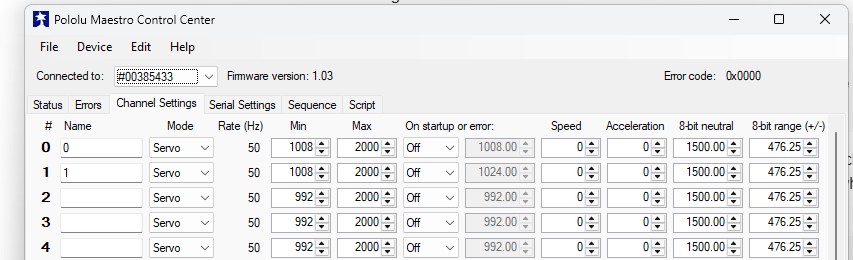
It sounds like you were expecting to use set target values of 0-180, but please note that your set_target() functions (and the one I provided above) are set up to accept the position in units of microseconds. The standard hobby RC servo range is 1000 to 2000 microseconds, and that is also the default limits for the Maestro, so you should probably be using that range instead. If you try to send values lower than 1000 the Maestro will instead use 1000 and if you send higher than 2000, the Maestro will instead use 2000 (unless you have changed the min and max range for that specific servo channel, which you can do from the “Channel Settings” tab of the Maestro Control Center).

Also, your code right now looks like it takes an input from the user than tries to update all 3 servos using that same target position for each of them. While there generally isn’t a problem with that, it was not clear to me if that is what you intended, especially considering one of your servos is a continuous rotation servo (the FEETECH FS5103R) and the others aren’t. A continuous rotation servo, instead of holding a set position, will spin continuously with a speed proportional to how far the target position is from its neutral position. If you want it to stop spinning, you can send it a target position equal to its neutral position. The neutral position is typically around 1500 microseconds, and on analog servos like the FEETECH FS5103R, it is adjustable by turning a built-in potentiometer (usually accessible on the casing just above where the cable comes out).

Brandon

1 Like
#!/usr/bin/python3

import sys
import usb.core
import usb.util

# Constant definitions mimicking the C++ implementation
VENDOR_ID = 0x1FFB
PRODUCT_IDS = [0x0089, 0x008A, 0x008B, 0x008C]
REQUEST_SET_TARGET = 0x85  # The standard Pololu Maestro native USB request ID


def find_maestro_device():
    """Loops through known product IDs to find the Pololu Maestro device."""
    for pid in PRODUCT_IDS:
        device = usb.core.find(idVendor=VENDOR_ID, idProduct=pid)
        if device is not None:
            return device
    return None


def set_target(device, position, servo):
    """Sends the target position to a specific servo channel using a control transfer."""
    # bmRequestType = 0x40 (Vendor-defined request, host-to-device direction)
    bm_request_type = 0x40
    b_request = REQUEST_SET_TARGET

    # Value parameter requires position in quarter-microseconds (input * 4)
    w_value = int(position * 4)
    w_index = int(servo)

    try:
        # usb.core.Device.ctrl_transfer(bmRequestType, bRequest, wValue, wIndex, data_or_wLength, timeout)
        device.ctrl_transfer(
            bm_request_type, b_request, w_value, w_index, data_or_wLength=0, timeout=5000
        )
    except usb.core.USBError as e:
        print(f"USB Transfer failed: {e}", file=sys.stderr)

def main():
    print("Searching for Pololu Maestro device...")
    device = find_maestro_device()

    if device is None:
        print("Error: Maestro device not found. Check physical connections or permissions.")
        sys.exit(1)

    print("Device found and initialized successfully.")
    #servo_channel = 0

    try:
        while True:
            user_input = input("Enter position (or 'q' to quit): ").strip()
            if user_input.lower() == "q":
                break

            try:
                position = int(user_input)
                
                if position >= 1000 and position <= 1249:
                    set_target(device, position, 0)
                    set_target(device, position, 1)
                    set_target(device, position, 2)
                    
                if position >= 1250 and position <= 1500:
                    set_target(device, position, 0)
                    set_target(device, position, 1)
                    set_target(device, position, 2)
                    
                if position >= 1501 and position <= 2000:
                    set_target(device, position, 0)
                    set_target(device, position, 1)                    
                    set_target(device, position, 2)
                    
            except ValueError:
                print("Invalid input. Please enter an integer number.")

    except KeyboardInterrupt:
        print("\nExiting program.")
    finally:
        # PyUSB handles closing the device and recycling handles implicitly on exit,
        # but clearing configurations ensures safe detachment.
        usb.util.dispose_resources(device)


if __name__ == "__main__":
    main()

so, something like this?

i am receiving no movement now. so would this line, w_value = int(position * 4), now not work as intended? now, i am slowing down and writing less while trying to understand more.

update

you taught me. i see the hole for the pot on the feetec servo!

Could you explain in more details what you are trying to do with this code?

With this snippet of code in particular, it looks like you are attempting to split the logic up 3 ways depending on the position value entered, but then code under each IF statement is identical:

if position >= 1000 and position <= 1249:
	set_target(device, position, 0)
	set_target(device, position, 1)
	set_target(device, position, 2)
                 
if position >= 1250 and position <= 1500:
	set_target(device, position, 0)
	set_target(device, position, 1)
	set_target(device, position, 2)
                    
if position >= 1501 and position <= 2000:
	set_target(device, position, 0)
	set_target(device, position, 1)                    
	set_target(device, position, 2)

Also, could you specify what position values are you sending and what are you expecting to happen compared to what is actually happening?

Brandon

sure,

if the position is around a number and another value, set_target.

i send 0 to 2000 depending on if the if statement is from those particular values.

for now, i am testing some basic principles to find out if some more numerical data will fit into my theory.

Hello.

Your description is too vague, and we cannot offer meaningful advice without a clear understanding of what you are trying to do. To provide a better answer to @BrandonM’s question perhaps try writing descriptions in this form with specific values:

Condition 1
When I send a position between #### and #### I want:

  • servo 1 to do…
  • servo 2 to do…
  • servo 3 to do…

Condition 2
When I send a position between #### and #### I want:

  • servo 1 to do…
  • servo 2 to do…
  • servo 3 to do…

- Patrick

1 Like
Sepcification:
Model: DS3218MG
Stall Torque (5V): 19 kg/cm (263.8oz/in)
Stall Torque (6.8V): 21.5 kg/cm (298.5 oz/in)
Control Angle: 270 degree rotation
Dead band: 3ÎĽs
Pulse : 500us-2500us
Speed : 0.16 sec/60°(5V) / 0.14 sec/60°(6.8V)
Operating Voltage: 4.8 ~ 6.8 DC Volts
Weight: 60 g (2.12 oz)
Motor Type: DC Motor
Gear Type: Copper & Aluminum
Working frequence: 1520ÎĽs / 333hz
CE Certification: Yes
RoHs:Yes
wire length:17.7inches(45cm)

I have found my servos and they are listed as DS3218 types.

I will try to better explain the source code and what I think should happen within the functions.

try:
                position = int(user_input)
                
                if position >= 1000 and position <= 1249:
                    set_target(device, position, 0)
                    set_target(device, position, 1)
                    set_target(device, position, 2)

in the if statement above, I was expecting each different servo to listen to the greater than or equal to 1000 and less than or equal to 1249. By the servos listening, I thought the servos would move to those 1000 to 2000 locations. I see now position is not changed and I need to alter position somehow.

So, user_input, in this case should alter position and not the if statement. I will read more in time on how servos work.

For example, if we want to set the target of servo 0 to 1500 µs, we could send the following byte sequence:


in hex: 0x84, 0x00, 0x70, 0x2E

is 0x00 equal to servo 0? And if so, is 0x01 equal to servo 1? From what I understand, the answers are both yes.

Now, there is something I am missing.

lsb is 0x70 and msb is 0x2E. Is that right?

Is there an overwhelmingly under simplified version to teach me the protocol?

#!/usr/bin/python3

import sys
import usb.core
import usb.util

# Constant definitions mimicking the C++ implementation
VENDOR_ID = 0x1FFB
PRODUCT_IDS = [0x0089, 0x008A, 0x008B, 0x008C]
REQUEST_SET_TARGET = 0x85  # The standard Pololu Maestro native USB request ID

ser0 = 0x00
ser1 = 0x01

def find_maestro_device():
    """Loops through known product IDs to find the Pololu Maestro device."""
    for pid in PRODUCT_IDS:
        device = usb.core.find(idVendor=VENDOR_ID, idProduct=pid)
        if device is not None:
            return device
    return None


def set_target(device, ser0, ser1, position):
    """Sends the target position to a specific servo channel using a control transfer."""
    # bmRequestType = 0x40 (Vendor-defined request, host-to-device direction)
    bm_request_type = 0x40
    b_request = REQUEST_SET_TARGET

    # Value parameter requires position in quarter-microseconds (input * 4)
    w_value = int(position * 4)
    w_index = int(ser0, ser1)

    try:
        # usb.core.Device.ctrl_transfer(bmRequestType, bRequest, wValue, wIndex, data_or_wLength, timeout)
        device.ctrl_transfer(
            bm_request_type, b_request, w_value, w_index, data_or_wLength=0, timeout=5000
        )
    except usb.core.USBError as e:
        print(f"USB Transfer failed: {e}", file=sys.stderr)

def main():
    print("Searching for Pololu Maestro device...")
    device = find_maestro_device()

    if device is None:
        print("Error: Maestro device not found. Check physical connections or permissions.")
        sys.exit(1)

    print("Device found and initialized successfully.")

    try:
        while True:
            user_input = input("Enter position (or 'q' to quit): ").strip()
            if user_input.lower() == "q":
                break

            try:
                position = int(user_input)

                if position <= 127:
                    set_target(device, ser0, ser1, position)
                    set_target(device, ser1, ser0, position)
                else:
                    position > 127
                    print('oops... ')

            except ValueError:
                print("Invalid input. Please enter an integer number.")

    except KeyboardInterrupt:
        print("\nExiting program.")
    finally:
        # PyUSB handles closing the device and recycling handles implicitly on exit,
        # but clearing configurations ensures safe detachment.
        usb.util.dispose_resources(device)


if __name__ == "__main__":
    main()

As you can tell, I am still having issues with the coding portion.

How does this code in hex, 0x84, 0x00, 0x70, 0x2E, move a servo to 1500 from 0?

0x84 = set_target
0x00 = servo number
0x70 = 112
0x2E = 46

I sort of already understand multiplication and I can transfer data from one base to another.

So, is 0x2E 75% of an input positional argument? Or, is 0x2E…oh.

Maybe I should take out the w_value = int(position * 4) or change it to reflect w_value = int(input * 4)?

I recommend reviewing the Serial Interface section of the Maestro user’s guide, and in particular, the Command Protocols and Serial Servo Commands subsections.

I’m not sure why you’re still using such a low position value (from your code it looks like you expect something less than 127). As I mentioned before, your set_target() function looks like it’s set up to accept values between 1000-2000, which represent the standard 1000-2000µs pulse width range.

I’m not sure I understand what you’re suggesting here, but in case it isn’t clear, the position variable is an argument to the function that gets set to the input variable when you call the function, for example:

position = int(user_input)
set_target(device, ser0, ser1, position)

It sounds like most of your difficulty right now might be coming from the basics of programming in Python, which is unfortunately beyond the scope of what we can help with. You might try finding someone closer/local with some programming experience that can help (e.g. perhaps someone at a makerspace, hackerspace, or robotics/programming club).

Brandon

1 Like

Yes and Yes,

@BrandonM , I have some trouble with python3 code conclusions at times.

Outside of that fact, I have been reviewing the different protocols you and your company have made available for the 18-channel maestro.

I will keep at it and return service once I configure some source code worthwhile.

For now, set_target and set_multiple_targets seem to be tricking me.

In the maestro control center, I set servo0 as 0 and servo1 as 1.

Can I use the alias of 0 for servo0 and 1 for servo1 in python3 once I apply the change in the Control Center?

@PatrickM and @BrandonM ,

Okay and first off, sorry.

Secondly, the wiring on the servo(s) were off. Due to some yellow, red, brown wiring, I made an error in placement because the BeagleY-AI board was retuning not found on the development desktop with the correct wiring.

An update/upgrade helped alleviate the issue.

Seth

What resources are you basing your code off of? For example, where did the definitions for your functions like set_target() come from?

To send a command to the Maestro to move any of your servos, you will need the channel number of that servo, not the name you assign the channel in the Maestro Control Center. It might be a good idea to save the channel numbers in variables with the same names you use in the Maestro Control Center to keep things organized, but if you’re just referring to them with numbers anyway, you can use those numbers directly in the commands.

- Patrick

1 Like

most of the code was derived via online research and the protocol.h file I turned into a .py file for specific use.

what does 0x40 signify in the serial commands? I am pretty sure this is an error or bug in the code.

I think I figured out some stuff.

1. serial_mode_usb_dual_port
    * can shut down the SBC
    * the cause?
2. at first I figured it was the pmic on the SBC
    * this USB device on the SBC may interact with whatever the pmic encounters
    * I will read more on their datasheets and spec
3. I will try another route
    * UART fixed baudrate
    * and with the pololu logic level shifter

One thing to help I think would be some code to mark the error when it transpires.

So, any feedback is valuable now.

1 Like

What protocol.h file are you talking about, and what are the primary online resources you’ve been referring to?

If you’re asking about the 0x40 value defined here:

# bmRequestType = 0x40 (Vendor-defined request, host-to-device direction)

The comment describes it accurately; this is a parameter defining the type of the USB request. I think this is unlikely to be the source of your problems.

Separately, I noticed an error in one of our earlier replies. In one of @BrandonM’s posts he directed you the Serial Interface section of the Maestro user’s guide, but since your code appears to be using the Maestro’s native USB interface, the primary reference for that is the source code of the Usc class in the Pololu USB SDK.

- Patrick

1 Like

Thank you for still replying and trying with me on this effort.

There was a protocol.h file I found by researching this forum.

#!/usr/bin/python3

# This C header file that defines the constants needed to communicate with the
#   Maestro via USB, USB serial, or TTL serial.

#   Most of the information here is also in Usc_protocol.cs.

#   This file can be included directly in C/C++ programs or used
#   as a reference when writing programs in other languages.

# Serial commands, sent on the virtual serial port or over TTL Serial.
# See the user's guide at http://www.pololu.com/docs/0J40 for more info.

import ctypes
from enum import Enum
import os
import sys

class uscCommand(Enum):
    COMMAND_SET_TARGET = 0x84, # 3 data bytes
    COMMAND_SET_SPEED = 0x87, # 3 data bytes
    COMMAND_SET_ACCELERATION = 0x89, # 3 data bytes
    COMMAND_GET_POSITION = 0x90, # 0 data
    COMMAND_GET_MOVING_STATE = 0x93, # 0 data
    COMMAND_GET_ERRORS = 0xA1, # 0 data
    COMMAND_GO_HOME = 0xA2, # 0 data
    COMMAND_STOP_SCRIPT = 0xA4, # 0 data
    COMMAND_RESTART_SCRIPT_AT_SUBROUTINE                = 0xA7, # 1 data bytes
    COMMAND_RESTART_SCRIPT_AT_SUBROUTINE_WITH_PARAMETER = 0xA8, # 3 data bytes
    COMMAND_GET_SCRIPT_STATUS = 0xAE, # 0 data
    COMMAND_MINI_SSC = 0xFF # (2 data bytes)

# These are the values to put in to bRequest when making a setup packet
# for a control transfer to the Maestro.  See the comments and code in Usc.cs
# for more information about what these requests do and the format of the
# setup packet.
class uscRequest(Enum):
    REQUEST_GET_PARAMETER = 0x81,
    REQUEST_SET_PARAMETER = 0x82,
    REQUEST_GET_VARIABLES = 0x83,
    REQUEST_SET_SERVO_VARIABLE = 0x84, # (also clears the serial timeout timer)
    REQUEST_SET_TARGET = 0x85,   # (also clears the serial timeout timer)
    REQUEST_CLEAR_ERRORS = 0x86, # (also clears the serial timeout timer)
    REQUEST_REINITIALIZE = 0x90,
    REQUEST_ERASE_SCRIPT = 0xA0,
    REQUEST_WRITE_SCRIPT = 0xA1,
    REQUEST_SET_SCRIPT_DONE = 0xA2, # value.low.b is 0 for go, 1 for stop, 2 for single-step
    REQUEST_RESTART_SCRIPT_AT_SUBROUTINE = 0xA3,
    REQUEST_RESTART_SCRIPT_AT_SUBROUTINE_WITH_PARAMETER = 0xA4,
    REQUEST_RESTART_SCRIPT = 0xA5,
    REQUEST_START_BOOTLOADER = 0xFF

# These are the bytes used to refer to the different parameters
# in REQUEST_GET_PARAMETER and REQUEST_SET_PARAMETER.  After changing
# any parameter marked as an "Init parameter", you must do REQUEST_REINITIALIZE
# before the new value will be used.
class uscParameter(Enum):
    PARAMETER_SERVOS_AVAILABLE                  = 1, # 1 byte - 0-5.  Init parameter.
    PARAMETER_SERVO_PERIOD                      = 2, # 1 byte - instruction cycles allocated to each servo/256, (units of 21.3333 us).  Init parameter.
    PARAMETER_SERIAL_MODE                       = 3, # 1 byte unsigned value.  Valid values are SERIAL_MODE_*.  Init parameter.
    PARAMETER_SERIAL_FIXED_BAUD_RATE            = 4, # 2-byte unsigned value; 0 means autodetect.  Init parameter.
    PARAMETER_SERIAL_TIMEOUT                    = 6, # 2-byte unsigned value (units of 10ms)
    PARAMETER_SERIAL_ENABLE_CRC                 = 8, # 1 byte boolean value
    PARAMETER_SERIAL_NEVER_SUSPEND              = 9, # 1 byte boolean value
    PARAMETER_SERIAL_DEVICE_NUMBER              = 10, # 1 byte unsigned value, 0-127
    PARAMETER_SERIAL_BAUD_DETECT_TYPE           = 11, # 1 byte - reserved

    PARAMETER_IO_MASK_A                         = 12, # 1 byte - reserved, init parameter
    PARAMETER_OUTPUT_MASK_A                     = 13, # 1 byte - reserved, init parameter
    PARAMETER_IO_MASK_B                         = 14, # 1 byte - reserved, init parameter
    PARAMETER_OUTPUT_MASK_B                     = 15, # 1 byte - reserved, init parameter
    PARAMETER_IO_MASK_C                         = 16, # 1 byte - pins used for I/O instead of servo, init parameter
    PARAMETER_OUTPUT_MASK_C                     = 17, # 1 byte - outputs that are enabled, init parameter
    PARAMETER_IO_MASK_D                         = 18, # 1 byte - reserved, init parameter
    PARAMETER_OUTPUT_MASK_D                     = 19, # 1 byte - reserved, init parameter
    PARAMETER_IO_MASK_E                         = 20, # 1 byte - reserved, init parameter
    PARAMETER_OUTPUT_MASK_E                     = 21, # 1 byte - reserved, init parameter

    PARAMETER_SCRIPT_CRC                        = 22, # 2 byte CRC of script
    PARAMETER_SCRIPT_DONE                       = 24, # 1 byte - if 0, run the bytecode on restart, if 1, stop

    PARAMETER_SERIAL_MINI_SSC_OFFSET            = 25, # 1 byte (0-254)

    PARAMETER_SERVO0_HOME                       = 30, # 2 byte home position (0=off; 1=ignore)
    PARAMETER_SERVO0_MIN                        = 32, # 1 byte min allowed value (x2^6)
    PARAMETER_SERVO0_MAX                        = 33, # 1 byte max allowed value (x2^6)
    PARAMETER_SERVO0_NEUTRAL                    = 34, # 2 byte neutral position
    PARAMETER_SERVO0_RANGE                      = 36, # 1 byte range
    PARAMETER_SERVO0_SPEED                      = 37, # 1 byte (5 mantissa,3 exponent) us per 10ms.  Init parameter.
    PARAMETER_SERVO0_ACCELERATION               = 38, # 1 byte (speed changes that much every 10ms). Init parameter.

    PARAMETER_SERVO1_HOME                       = 39
    # The pattern continues.  Each servo takes 9 bytes of configuration space.

class servoSetting(ctypes.Structure):
    position = [(ctypes.c_uint16)]
    target = [(ctypes.c_uint16)]
    speed = [(ctypes.c_uint16)]
    acceleration = [(ctypes.c_uint8)]

# uscVariables: This struct stores all the variables that can be read via
#   REQUEST_GET_VARIABLES.

#   There are 12 bytes used per servo setting
class uscVariables(ctypes.Structure):

    # Fix bytecode_asm.asm if you change the order or size of
    # variables in this struct.

    _fields_ = [
    # offset: 0
      ('stackPointer', ctypes.c_uint8),

    # offset: 1
      ('callStackPointer', ctypes.c_uint8),

    # offset: 2
      ('errors', ctypes.c_uint16),

    # offset: 4
      ('programCounter', ctypes.c_uint16),

    # offset: 6
      ('buffer[3]', ctypes.c_int16), # protects other RAM from being corrupted by improper instructions

    # offset: 12
      ('stack[32]', ctypes.c_int16),

    # offset: 76
      ('callStack[10]', ctypes.c_uint16),

    # offset: 96
      ('scriptDone', ctypes.c_uint8), # 1 = done; 2 = about to run a single step then be done - placed here to protect against accidental overwriting of Setting

    # offset: 97
      ('buffer2', ctypes.c_uint8) # protects other RAM from being corrupted by improper instructions
    ]
    # offset: 98
class servoSetting(ctypes.Structure):
    _fields_ = [('servoSetting[6]', ctypes.c_uint16)]
    # total length 139 bytes

BAUD_DETECT_TYPE_AA = 0 # 0u in C/C++
BAUD_DETECT_TYPE_FF = 1 # 1u in C/C++

# serialMode: Value of PARAMETER_SERIAL_MODE.
class serialMode(Enum):
    # On the Command Port, user can send commands and receive responses.
    # TTL port/UART are connected to make a USB-to-serial adapter.
    SERIAL_MODE_USB_DUAL_PORT = 0,

    # On the Command Port, user can send commands to UMC01 and
    # simultaneously transmit bytes on the UART TX line, and user
    # can receive bytes from the UMC01 and the UART RX line.
    # COM2 does not do anything.
    SERIAL_MODE_USB_CHAINED = 1,

    # On the UART, user can send commands and receive reponses.
    # Command Port and TTL Port don't do anything.
    SERIAL_MODE_UART_DETECT_BAUD_RATE = 2,
    SERIAL_MODE_UART_FIXED_BAUD_RATE = 3

# There are several different errors.  Each error is represented by a
# different bit number from 0 to 15.
ERROR_SERIAL_SIGNAL           = 0
ERROR_SERIAL_OVERRUN          = 1
ERROR_SERIAL_BUFFER_FULL      = 2
ERROR_SERIAL_CRC              = 3
ERROR_SERIAL_PROTOCOL         = 4
ERROR_SERIAL_TIMEOUT          = 5
ERROR_SCRIPT_STACK            = 6
ERROR_SCRIPT_CALL_STACK       = 7
ERROR_SCRIPT_PROGRAM_COUNTER  = 8

I just tried to turn it into python3 use cases for future building blocks.

And yes sir about 0x40. Thank you for the clarification.