LiPo battery on Romi 32U4

Hello,

I currently have a Raspberry Pi 3 Model B mounted on my Romi 32U4. I am currently running a lot of programs on my Pi which is draining the batteries. The battery power is insufficient with double A batteries. I was wondering is there is a way to use a LiPo battery instead? If so, do I have to get any extra components, or can I just solder something together?

Thank you,
Mohamed Hadrami

Hello, Mohamed.

It should generally be fine to power the Romi 32U4 Robot with a LiPo battery, as long as you stay within the operating voltage range (the maximum operating voltage of the Romi 32U4 Control Board is limited to 10.8V by the motor driver).

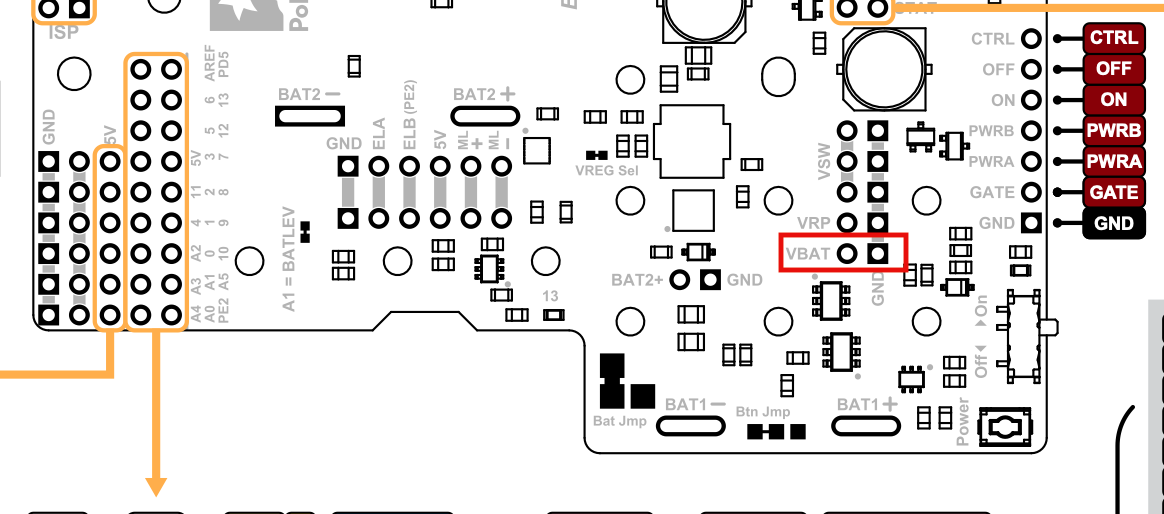
As far as connecting it, you will probably want to solder a cable to the boards with a connector that mates with the one on your battery. You can connect the power between the BAT2- and BAT1+ terminals (it would probably be more practical to remove the battery contacts and solder a jumper cable directly to the board). Alternatively, you could connect it to the VBAT and GND pins on the board (which line up with the battery shaped cutout on the chassis).

Brandon

Hi, just found this thread. I upgraded my Romi from a Pi 3b+ to Pi 4b and started getting brownout with the standard 6x AA NiMH batteries. I suspect it’s an amps issue since the pi 4 wants 2.5 -3A and I don’t think the batteries can supply that.
I like the idea of going to a LiPo battery and empty AA compartment so just wanna confirm the connection point here as highlighted in diagram with red box. Also that this would supply power to all areas that the AA batteries were before. It looks like the LiPo cell voltage is 3.7V, so is the 2S at 7.4V the best/only option?

Thanks!
Matt

Hello, Matt.

The power for the Raspberry Pi goes through an onboard switching regulator, which under typical conditions has around 2A available for powering the Raspberry Pi. So, the brownouts might be occurring because the regulator is dropping out and not the batteries. You might try monitoring the VBAT, VRP, and 5V voltages with an oscilloscope to get a better idea of what is going on.

Have you tried with a different set of batteries (or verified that the ones you’re using are charged and not too old)? VBAT is directly connected to the battery contacts and supplies power to the whole board (including the input to the regulators and motor drivers), so if you determine that the batteries are the culprit you could connect your LiPo there. Since the maximum voltage of the motors drivers is 10.8V, you should not use more than a 2S LiPo.

Brandon

Thanks, to answer questions:

  • Batteries: yes, I’ve got two sets and the newer ones work better. All tests are with fully charged batteries. The brownout error typically tells me when they’re done, whereas I used to get the warning beep (voltage I think) when using a pi 3b.
  • Monitoring voltage: I’ve checked on the wpilib dash when this is happening and the voltage will be at like 6.8V which should be plenty for the pi. I think it’s current since I used to get the loud beeping when batteries got low and I don’t get that here, just the beep and brownout message.

I guess my next question is whether that switching regulator actively limits amps at 2A or that just what is what’s available to the pi from 32U4 on AA setup? It won’t actually help me to add a power supply with more amps if the 32U4 limits what goes to the pi!

From the raspberry pi site, the 4b actually wants 3A with a min of 2.5A if peripherals are limited. I have a pi5 I want to use once wpilib supports that for the romi and that’s a 5A device. I’m thinking I could power the pi separately with a 5V supply at higher amps but need to address this issue I see in the manual:
An ideal diode circuit on the control board prevents reverse current from flowing into the Romi 32U4 Control Board’s 5 V supply if the Raspberry Pi is separately powered (for example, through its USB power receptacle). However, starting with the Raspberry Pi 3 Model B+, there is no corresponding ideal diode circuit on the Raspberry Pi’s USB power input, so it is possible for the control board to backfeed a USB power adapter through the Raspberry Pi. As a result, we do not recommend connecting external USB power to the Raspberry Pi while it is powered through the control board.

I see a note that you can shut down power to the pi:
" Power provided to the Raspberry Pi can be switched off by driving the Raspberry Pi shutdown pin, RPISHDN , to 5 V."
Is that sufficient? I am also able to cut the appropriate pins on the pi so it does not get power from the 32U4 board if necessary.

Let me know what you think

The onboard regulator does not actively limit its current output to 2A, but if the current draw is over 2A for long enough, it can enter thermal shutdown and turn off. If the Raspberry Pi is just reporting a low voltage warning and not shutting off entirely, you probably aren’t running into this limit yet, but could be something to keep in mind just in case.

I suspect the Raspberry Pi 4B can draw bursts of current upwards of 3A or so, but probably isn’t drawing over 2A continuously (it’s likely closer to the idle current draw of 600mA with spikes depending on what it is doing).

Tying the RPISHDN pin high should be enough to prevent problems when powering the Raspberry Pi from an external source.

Brandon

Thanks Brandon, that’s very helpful. Sorry, didn’t see this for a couple days and need to figure out notification settings!

So here’s the actual error messaging off the pi attached to the Romi and running via the wpilib simulator. So it’s assuming a brownout from another condition which muddies the water even more as to what is happening.

================Log from Romi pi =========
Successfully connected

2023-02-19T22:17:40.588Z [ROMI] info: New WS Connection from 10.0.0.129

2023-02-19T22:17:40.590Z [SVC-DS] info: Advertised NT Server address updated to: 10.0.0.129

2023-02-19T22:17:40.592Z [MAIN] info: Starting NT Client

2023-02-19T22:17:40.593Z [NTCORE] info: Creating new NT client

2023-02-19T22:17:40.663Z [NTCORE] info: Socket connected to 10.0.0.129:1735

2023-02-19T22:17:40.671Z [ROMI] info: DS Packet Heartbeat Acquired

2023-02-19T22:17:40.671Z [ROMI] info: Robot DISABLED

2023-02-19T22:17:40.734Z [NTCORE-CLIENT-V3] info: NT Connection established to 10.0.0.129:1735

2023-02-19T22:17:41.172Z [ROMI] warn: DS Packet Heartbeat Lost

2023-02-19T22:17:45.813Z [ROMI] info: DS Packet Heartbeat Acquired

2023-02-19T22:17:45.816Z [ROMI] info: Robot ENABLED

2023-02-19T22:18:43.391Z [I2C-ERRDETECT-default] info: Setting Error State

2023-02-19T22:18:43.457Z [ROMI] warn: Status byte is 0. Assuming brown out. Rewriting IO config

2023-02-19T22:18:43.892Z [I2C-ERRDETECT-default] info: Clearing Error State - Latest error reported lies outside of window(500ms)

2023-02-19T22:18:45.632Z [ROMI] info: Firmware Identifier: 118

2023-02-19T22:18:47.616Z [ROMI] warn: DS Packet Heartbeat Lost

2023-02-19T22:18:48.118Z [ROMI] info: DS Packet Heartbeat Acquired