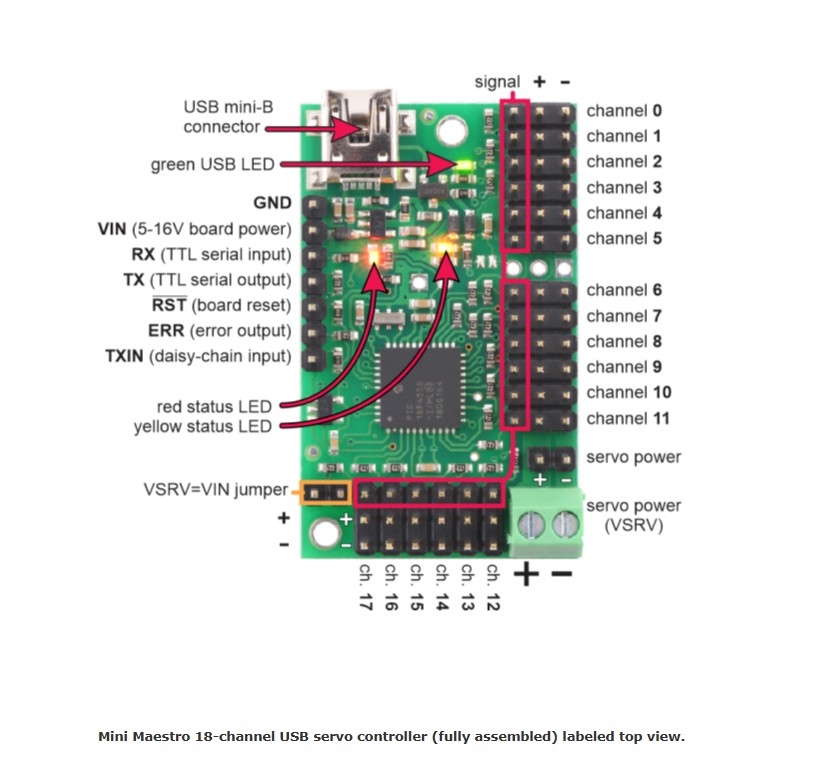
I have the maestro attached!

I looked here: Pololu - 7.a. Powering the Maestro

Would I not need a GND and PWR connection outside of the USB connection to maneuver the Servo in question?

I cannot find details on the silkscreen for the Maestro for PWR and/or GND.

Seth

P.S. Please send guidance. I see the UART (RX/TX) and GND and PWR but the PWR/GND connector on the Mini Maestro 18 does not provide the connector arrangement on the silkscreen…

I found something!

Hello, Seth.

I’m not entirely sure how that diagram answers your question better than the “Powering the Maestro” section of the user’s guide that you linked to in your first post, but to clarify for anyone else who comes across this thread, the Maestro’s logic side can be powered by USB or through the VIN pin, but you will need a separate source to power the servos through the servo power rail (labeled “+” or “BAT” on the silkscreen). Alternatively, if you are using a power supply that is sufficient for both the servos and the Maestro, you can connect it to both the servo power rail and VIN (on the Mini Maestro boards, this can be achieved by connecting it to the servo power rail and using the VSRV=VIN jumper to power the Maestro).

Brandon

The latter, @BrandonM , called Servo Power (VSRV) on the photo I found online is the part that powers and grounds the PWR and GND to the Servo Headers right?

For some reason, I do not have that listed on my silkscreen. The only reason I knew of (VSRV) is because of the above photo I found.

I searched on the top view. I searched on the bottom view.

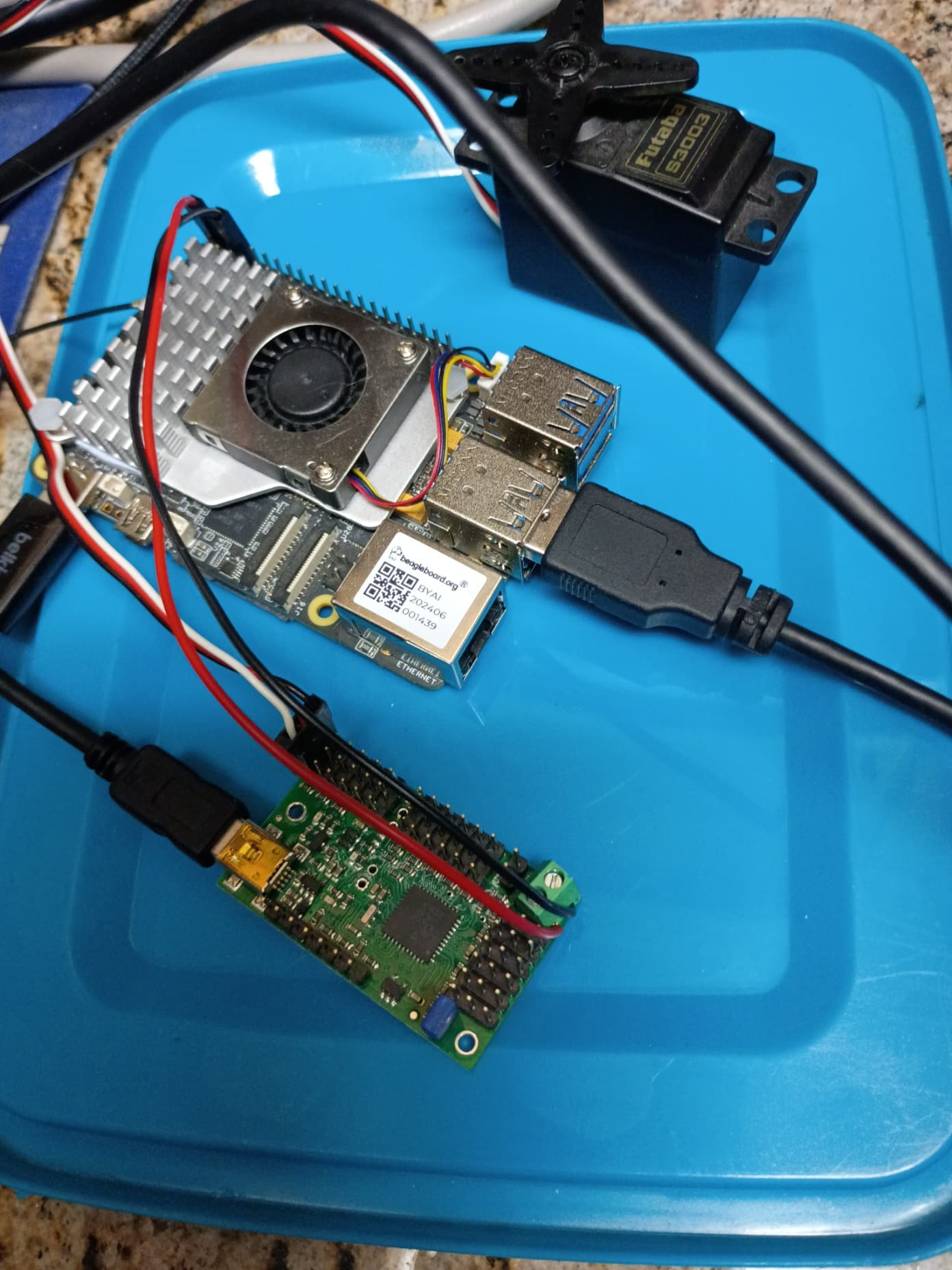
Here is a photo of what works for me for now… Maybe I am misunderstanding something.

Does that seem correct?

Powering the Maestro through USB and the servo power rail through the terminal block as shown in your picture is fine. However, you should probably double check that your servo power source can handle the current demands of your servo. With a quick search, it does not look like Futaba lists the maximum current draw for the S3003 servo, but a good rule of thumb is to budget around 1A per standard size servo.

Brandon

1 Like

Thank you. I understand what I thought I understood.

Also, 1A, got it.

Another thing…

I was reading some older source in C/C++ from the record archives on how to program these servo machines.

I see predetermined answers to calls. Anyway, here is an example:

In C/C++:

#DEFINE BAUD_DETECT_TYPE_AA 0u // C/C++ source code
#DEFINE BAUD_DETECT_TYPE_FF 1u // C/C++ source code

In Python3:

BAUD_DETECT_TYPE_AA = 0u # Leading zeros is called something in Python3
BAUD_DETECT_TYPE_FF = 1u #

zfill and rjust will not work in this circumstance.

I am reading the protocol.h file from this forum and learning how to write it in Python3 for now.

Right now and I can understand the source code because of the error:

SyntaxError: invalid decimal literal

Basic syntax error but as soon as I change it, the error will be more complicated down the lines in the source code. Is there a specific change to make to leading 0’s in C/C++ turn into Python3 source code that you know about currently?

For instance… I am not using ctypes in python3.

I am just having a complication with the baudrate for dual port in Python3 right now while transferring the data to Python3 from C/C++.

If this makes absolutely no sense. Okay. I will accept it and try harder to make sense. I guess I am trying to get around using ctypes in python3.

update

I cannot convert the protocol.h file to python3 just yet.

blockers:

  • enum in python3
  • struct in python3

This line is the line in question that so far I cannot make work in Python3. Does anyone know of any workarounds or Python3 source to handle this exact location on the protocol.h file but for Python3?

Update

I got the .h file in question working in Python3 with some specific imports:

import enum
import ctypes

These two helped me the most while distinguishing their classes and definitions that can be used as source code for helping me along the way.

Aw. I can relax finally. Sorry for making such a big hoopla about it all. I thought my experience and research skills were not well done enough to conquer the task, i.e. this is why I was reaching out.

Another Update

Now, I am on to simplifying the python3 library and classes within the library to use them for a simple 3 DoF arm.

Hopefully, I can configure it without harassing you guys/gals any longer.

@BrandonM ,

Hey sir, Seth here. I got some working source so far for the Maestro in Python3 but with me and my learning curve, I am seeing anomalies in the way things work “for me” while the SDK needs additional data (I think).

I know this weekend is Memorial Day weekend. So, no big woof about replying early or even by next Wed.

I will post the source and the anomaly soon so you can see what I am describing.

#!/usr/bin/python3

import sys
import usb.core
import usb.util
from protocol import *
import numpy as np
from time import sleep

# Constant definitions mimicking the C++ implementation
VENDOR_ID = 0x1FFB
PRODUCT_IDS = [0x0089, 0x008A, 0x008B, 0x008C]
REQUEST_SET_TARGET = 0x85  # The standard Pololu Maestro native USB request ID


def find_maestro_device():
    """Loops through known product IDs to find the Pololu Maestro device."""
    for pid in PRODUCT_IDS:
        device = usb.core.find(idVendor=VENDOR_ID, idProduct=pid)
        if device is not None:
            return device
    return None


def set_target(device, position, servo=0):
    """Sends the target position to a specific servo channel using a control transfer."""
    # bmRequestType = 0x40 (Vendor-defined request, host-to-device direction)
    bm_request_type = 0x40
    b_request = REQUEST_SET_TARGET

    # Value parameter requires position in quarter-microseconds (input * 4)
    w_value = int(position * 4)
    w_index = int(servo)

    try:
        # usb.core.Device.ctrl_transfer(bmRequestType, bRequest, wValue, wIndex, data_or_wLength, timeout)
        device.ctrl_transfer(
            bm_request_type, b_request, w_value, w_index, data_or_wLength=0, timeout=5000
        )
    except usb.core.USBError as e:
        print(f"USB Transfer failed: {e}", file=sys.stderr)

def create_3dof_matrix(x, y, theta_rad):
    """
    Creates a 3 DoF homogeneous transformation matrix (3x3).

    Parameters:
    x, y      : Translation along X and Y axes
    theta_rad : Rotation angle in radians
    """
    cos_t = np.cos(theta_rad)
    sin_t = np.sin(theta_rad)

    # Define the 3x3 transformation matrix
    matrix = np.array([
        [cos_t, -sin_t, x],
        [sin_t,  cos_t, y],
        [0,      0,     1]
    ])

    return matrix

def create_3dof_action():

    action = np.array([
        [1.5, 1.0, 0.5, 0.0],
        [-1.5, -1.0, -0.5, 0.0],
        [5.0, -5.0, 2.5, -2.5],
        [0.0, 1.1, -1.1, 0.0]
    ])

    return action

# 1. Define transformation parameters (Move 5 units X, 2 units Y, Rotate 45 degrees)
angle = np.radians(45)
T_a_to_b = create_3dof_matrix(5.0, 2.0, angle)

print("Transformation Matrix (Frame A to B):")
print(T_a_to_b)

# 2. Define a point in Frame B: [X, Y, 1] for homogeneous coordinates
point_in_b = np.array([1.0, 0.0, 1.0])

# 3. Transform the point to Frame A using matrix multiplication
point_in_a = np.dot(T_a_to_b, point_in_b)

print("\nTransformed Point in Frame A:")
print(point_in_a[:2]) # Extract just the X and Y coordinates


def main():
    print("Searching for Pololu Maestro device...")
    device = find_maestro_device()

    if device is None:
        print("Error: Maestro device not found. Check physical connections or permissions.")
        sys.exit(1)

    print("Device found and initialized successfully.")
    servo_channel = 0

    try:
        while True:
            user_input = input("Enter position (or 'q' to quit): ").strip()
            if user_input.lower() == "q":
                break

            try:
                position = int(user_input)                       # LINE 500
                set_target(device, position, servo_channel)   # LINE 501

                else:
                    return position
            except ValueError:
                print("Invalid input. Please enter an integer number.")

    except KeyboardInterrupt:
        print("\nExiting program.")
    finally:
        # PyUSB handles closing the device and recycling handles implicitly on exit,
        # but clearing configurations ensures safe detachment.
        usb.util.dispose_resources(device)


if __name__ == "__main__":
    main()

The source code above was derived from various sources and installed on a SBC. It is a work in progress as I make this 3 DoF Arm and more…

Anyway, the source code above has two comments, LINE 500 and LINE 501, that I just commented on for this error:

On various occasions while running the source, I get working order commands that do what is intended. Other times, I get nothing. I know why now, i.e. permissions and lack of Pythonista coding skills from me.

In any light and here, those lines in comments listed work. I can just type positive to negative integers all day.

That is not my end game here. It seems if I put in a set of source code, the errors arise. Here…

if position >= 49 or position != 0:
    set_target(device, position, servo_channel)
    ...

usually when I use specific interfaces/peripherals on SBC boards like the beagleboard.org setlist, I can alter the source code well enough.

I am seemingly coming to a halt where I cannot understand why things are transpiring in the source code and/or for what reasons the source code is working or not working.

I know this is my issue. I should know what I am doing before I do it. I got in a rush in some backlogs of the SDK without reviewing it completely and understanding everything.

Do you or anyone else see why the listed LINE 500 and LINE 501 comments are working while my listed if statement does not do what is intended?

Seth

P.S. And…if you could point me to a handy tutorial in Python3 for your Maestro, we could be besties! For life! All jokes aside, any explanation will suffice. This is for one servo from the Maestro Mini 18.

I do not recognize that code; could you post a link to where you got it? It is not immediately clear to me why your IF statement is causing problems from the out-of-context snipped you posted. If you are still having problems, could you post the complete code after making your modification?

Unfortunately, we do not have any Python examples for the Maestro, although you can find a couple community-created Python resources in the “Related Resources” section of the Maestro user’s guide.

Brandon

1 Like

I researched ideas online and came up with something…

Most of the “something” I used was generated and I made some small contributions.

I should have gotten the link to the search results so I could post it. It has been a couple weeks and the source code changed online with the link being up.

So, every time I boot the ole computer, the source code changes from this to that…

hence, me not giving it a 100% credit. This is when I had to stop using most of the generated code and try to alter things myself.

What I came up with is the above code. I will simplify it soon and report back.

Seth

@BrandonM ,

Sorry to get on here so late in the night. Here is the source code that was researched at various locations that kept changing. So, I made my contribution(s) to it all.

#!/usr/bin/python3

import sys
import usb.core
import usb.util
from protocol import *
import numpy as np
from time import sleep

# Constant definitions mimicking the C++ implementation
VENDOR_ID = 0x1FFB
PRODUCT_IDS = [0x0089, 0x008A, 0x008B, 0x008C]
REQUEST_SET_TARGET = 0x85  # The standard Pololu Maestro native USB request ID


def find_maestro_device():
    """Loops through known product IDs to find the Pololu Maestro device."""
    for pid in PRODUCT_IDS:
        device = usb.core.find(idVendor=VENDOR_ID, idProduct=pid)
        if device is not None:
            return device
    return None


def set_target(device, position, servo=0):
    """Sends the target position to a specific servo channel using a control transfer."""
    # bmRequestType = 0x40 (Vendor-defined request, host-to-device direction)
    bm_request_type = 0x40
    b_request = REQUEST_SET_TARGET

    # Value parameter requires position in quarter-microseconds (input * 4)
    w_value = int(position * 4)
    w_index = int(servo)

    try:
        # usb.core.Device.ctrl_transfer(bmRequestType, bRequest, wValue, wIndex, data_or_wLength, timeout)
        device.ctrl_transfer(
            bm_request_type, b_request, w_value, w_index, data_or_wLength=0, timeout=5000
        )
    except usb.core.USBError as e:
        print(f"USB Transfer failed: {e}", file=sys.stderr)

def main():
    print("Searching for Pololu Maestro device...")
    device = find_maestro_device()

    if device is None:
        print("Error: Maestro device not found. Check physical connections or permissions.")
        sys.exit(1)

    print("Device found and initialized successfully.")
    servo_channel = 0

    try:
        while True:
            user_input = input("Enter position (or 'q' to quit): ").strip()
            if user_input.lower() == "q":
                break

            try:
                position = int(user_input)
                set_target(device, position, servo_channel)
                if position >= 49 or position != 0:
                    device
                    position=22
                    servo_channel
                    sleep(2)
                    set_target(device, position, servo_channel)
                    sleep(0.5)
                else:
                    return position
            except ValueError:
                print("Invalid input. Please enter an integer number.")

    except KeyboardInterrupt:
        print("\nExiting program.")
    finally:
        # PyUSB handles closing the device and recycling handles implicitly on exit,
        # but clearing configurations ensures safe detachment.
        usb.util.dispose_resources(device)


if __name__ == "__main__":
    main()

Part of it is a Protocol.h file that was translated to Python3 (I did it). Part is research and the rest is basic source code paraphrasing with a couple of additions.

Seth

P.S. I chose PyUSB to handle the default /dev/ttyACM0 in the fs. The try-try and except-except source is for handling some found source and some paraphrased source from various ideas from me. So far, it all works as is for now. The main issue I am having is porting more Servos for now and making the Matrices work that I listed earlier.

update

Now, I am not claiming to know anything or everything about PyUSB, /dev/ttyACM(N), and/or what I have done with the protocol.py file thus far. I am still learning what can be achieved via these protocols and specifications.