I ordered a 12 channel maestro servo receiver and all works great with the USB cable.
I was able to send the script to the controller. If I give power to the VIN, the servos begin to run.
No I use it for a pilot in a RC helicopter. I thought I can start the controller via the receiver in the helicopter.
I did not find an answer in the forum, I found something to make it with a special switch, but am not sure how to conect to the maestro controller. Is it possible to connect the receiver directly with the controller?
Hello, has nobody tried to run the maestro servo controller directly via the receiver output?
What other parts I need to start the maestro via my RC receiver?
Can you be more specific about what you’re trying to do? What do you mean by “start the maestro”? RC hobby servos are designed to work directly with an RC receiver, so it’s not clear what function the Maestro is serving in your system.
I have stored a script to the maestro controller. He controls 8 servos in a pilot figure torso.
Now the figure sits in an RC helicopter. I want to start the pilot moving with head and hands, for example that he look s to the people during flying in front of them.
So I have to start the stored movings during the flight, means I have to give the start signal via my radio conrol to the receiver. Now I don’t know how I can start the movements with my RC signal from the receiver.
Do I need a special switch that goes out of the receiver and gives the signal to the controller, or can I send direct a signal from the receiver to the controller to start the movements.
If yes, do you have such a switch and which contacts do I have to use in the controller for that.
Thanks for the clarification, Mat. The Maestro does not have inputs capable of reading RC servo pulses, so you will need something between the Maestro and your RC receiver. I think the easiest solution might be to use our RC switch to convert the RC receiver channel output into a digital signal based on the channel value.
I would like to revive this topic again as I have the exact same problem. What I learned from the conversation before is that I need an RC switch. Ok, I have one in front of me, but I have no idea which pins I need to use to connect the RC switch to the Maestro 24.
Sorry for this stupid question I’m not talented in regards to electronics but I can create Tank’s
It will be wonderfull somebudy can answer my question
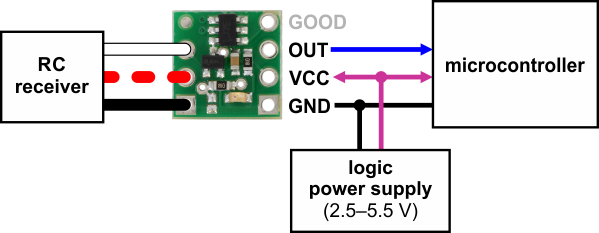
Since the RC switch linked earlier in this post has been discontinued, I’m assuming you have the newer RC Switch with Digital Output that replaced it. If that’s the case, you can refer to the diagram on the product page:
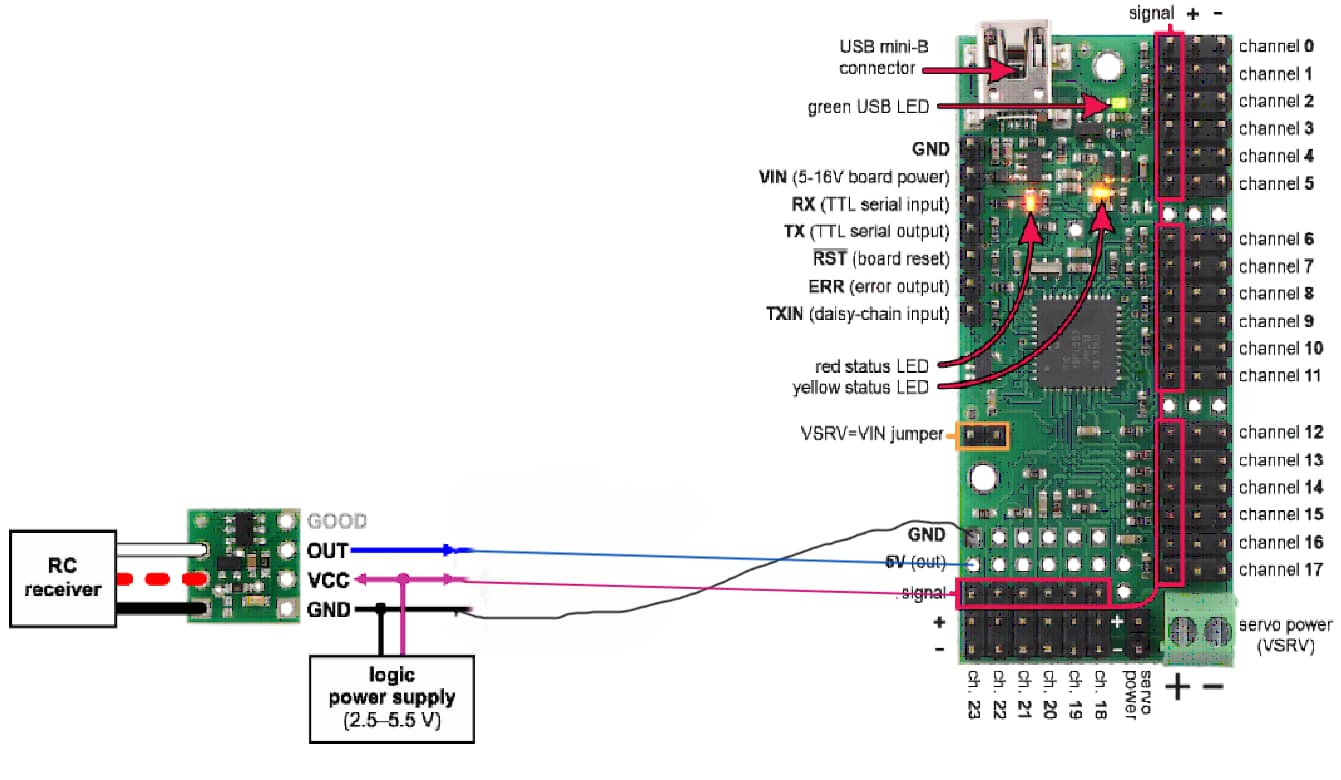
Essentially, your RC receiver connects to one side of the RC switch (RC signal to “IN”, power to “VRC”, and ground to ground), then you can connect the output to the Maestro (OUT to the Maestro channel you’re using to read the signal, VCC to the Maestro’s 5V pin, and GND to GND). You will need to configure the “Mode” of the Maestro channel you’re using to input, which you can do from the Channel Settings tab of the Maestro Control Center. If it’s all working correctly, you should be able to see the slider for that channel react to your RC signal in the “Status” tab.
It looks like you have your VCC and OUT connections swapped. VCC on the RC switch should go to one of the Maestro’s “5V (out)” pins and OUT on the RC switch should go to one of the Mestro’s signal pins.




 but I can create Tank’s